Showing posts with label Spoofing. Show all posts
Showing posts with label Spoofing. Show all posts
Saturday, 5 March 2016

Wednesday, 4 December 2013
15-Most Usefull Hacking Tools

Note: This tutorial is only for Educational Purposes, I did not take any responsibility of any misuse, you will be solely responsible for any misuse that you do.
1. NMAP

Nmap (“Network Mapper”) is a free and open source (license) utility for network discovery and security auditing. Nmap uses raw IP packets in novel ways to determine what hosts are available on the network, what services (application name and version) those hosts are offering, what operating systems (and OS versions) they are running, what type of packet filters/firewalls are in use, and dozens of other characteristics.
DOWNLOAD IT FROM HERE
2. WIRESHARK

Wireshark is a network protocol analyzer. It lets you capture and interactively browse the traffic running on a computer network.
DOWNLOAD IT FROM HERE
3. METASPLOIT COMMUNITY EDITION

Metasploit Community Edition simplifies network discovery and vulnerability verification for specific exploits, increasing the effectiveness of vulnerability scanners. This helps prioritize remediation and eliminate false positives, providing true security risk intelligence.
DOWNLOAD IT FROM HERE
4. NIKTO2

Nikto is an Open Source (GPL) web server scanner which performs comprehensive tests against web servers for multiple items, including over 6400 potentially dangerous files/CGIs, checks for outdated versions of over 1200 servers, and version specific problems on over 270 servers. It also checks for server configuration items such as the presence of multiple index files, HTTP server options, and will attempt to identify installed web servers and software.
DOWNLOAD IT FROM HERE
5. JOHN THE RIPPER

John the Ripper is a fast password cracker, currently available for many flavors of Unix, Windows, DOS, BeOS, and OpenVMS. Its primary purpose is to detect weak Unix passwords. Besides several crypt(3) password hash types most commonly found on various Unix systems, supported out of the box are Windows LM hashes, plus lots of other hashes and ciphers in the community-enhanced version.
DOWNLOAD IT FROM HERE
6. ETTERCAP

Ettercap is a comprehensive suite for man in the middle attacks. It features sniffing of live connections, content filtering on the fly and many other interesting tricks. It supports active and passive dissection of many protocols and includes many features for network and host analysis.
DOWNLOAD IT FROM HERE
7. NEXPOSE COMMUNITY EDITION
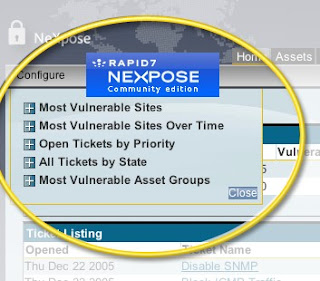
The Nexpose Community Edition is a free, single-user vulnerability management solution. Nexpose Community Edition is powered by the same scan engine as Nexpose Enterprise and offers many of the same features.
DOWNLOAD IT FROM HERE
8. NCAT

Ncat is a feature-packed networking utility which reads and writes data across networks from the command line. Ncat was written for the Nmap Project as a much-improved reimplementation of the venerable Netcat. It uses both TCP and UDP for communication and is designed to be a reliable back-end tool to instantly provide network connectivity to other applications and users. Ncat will not only work with IPv4 and IPv6 but provides the user with a virtually limitless number of potential uses.
DOWNLOAD IT FROM HERE
9. KISMET

Kismet is an 802.11 layer2 wireless network detector, sniffer, and intrusion detection system. Kismet will work with any wireless card which supports raw monitoring (rfmon) mode, and (with appropriate hardware) can sniff 802.11b, 802.11a, 802.11g, and 802.11n traffic. Kismet also supports plugins which allow sniffing other media such as DECT.
DOWNLOAD IT FROM HERE
10. W3AF

w3af is a Web Application Attack and Audit Framework. The project’s goal is to create a framework to find and exploit web application vulnerabilities that is easy to use and extend.
DOWNLOAD IT FROM HERE
11. HPING

hping is a command-line oriented TCP/IP packet assembler/analyzer. The interface is inspired to the ping(8) unix command, but hping isn’t only able to send ICMP echo requests. It supports TCP, UDP, ICMP and RAW-IP protocols, has a traceroute mode, the ability to send files between a covered channel, and many other features.
DOWNLOAD IT FROM HERE
12. BURPSUITE

Burp Suite is an integrated platform for performing security testing of web applications. Its various tools work seamlessly together to support the entire testing process, from initial mapping and analysis of an application’s attack surface, through to finding and exploiting security vulnerabilities.
DOWNLOAD IT FROM HERE
13. THC-HYDRA

A very fast network logon cracker which support many different services.
DOWNLOAD IT FROM HERE
14. SQLMAP

sqlmap is an open source penetration testing tool that automates the process of detecting and exploiting SQL injection flaws and taking over of database servers. It comes with a powerful detection engine, many niche features for the ultimate penetration tester and a broad range of switches lasting from database fingerprinting, over data fetching from the database, to accessing the underlying file system and executing commands on the operating system via out-of-band connections.
DOWNLOAD IT FROM HERE
15. WEBSCARAB

WebScarab has a large amount of functionality, and as such can be quite intimidating to the new user. But, for the simplest case, intercepting and modifying requests and responses between a browser and HTTP/S server, there is not a lot that needs to be learned.
DOWNLOAD IT FROM HERE
Spoofing Mac Address
Spoofing Mac Address of Network Adapter ?

Hi guyz this is small and very useful tutorial for hacking on entering the networks.
Ex: Some of the networks wont allow the new pc's or laptop's in the network without the admin permission if the user has the original id and password also, it means the administrator is blocking the mac address of that pc or laptop,
Small notes on Mac Address
Quote
In computer networking, a Media Access Control address (MAC address) is a unique identifier assigned to most network adapters or network interface cards (NICs) by the manufacturer for identification, and used in the Media Access Control protocol sublayer. If assigned by the manufacturer, a MAC address usually encodes the manufacturer's registered identification number. It may also be known as an Ethernet Hardware Address (EHA), hardware address, adapter address, or physical address.
There are three numbering spaces, managed by the Institute of Electrical and Electronics Engineers (IEEE), which are in common use for formulating a MAC address: MAC-48, EUI-48, and EUI-64. The IEEE claims trademarks on the names "EUI-48" and "EUI-64", where "EUI" stands for Extended Unique Identifier.
Although intended to be a permanent and globally unique identification, it is possible to change the MAC address on most of today's hardware, an action often referred to as MAC spoofing. Unlike IP address spoofing, where a sender spoofing their address in a request tricks the other party into sending the response elsewhere, in MAC address spoofing (which takes place only within a local area network), the response is received by the spoofing party.
A host cannot determine from the MAC address of another host whether that host is on the same OSI Layer 2 network segment as the sending host, or on a network segment bridged to that network segment.
In TCP/IP networks, the MAC address of a subnet interface can be queried with the IP address using the Address Resolution Protocol (ARP) for Internet Protocol Version 4 (IPv4) or the Neighbor Discovery Protocol (NDP) for IPv6. On broadcast networks, such as Ethernet, the MAC address uniquely identifies each node and allows frames to be marked for specific hosts. It thus forms the basis of most of the Link layer (OSI Layer 2) networking upon which upper layer protocols rely to produce complex, functioning networks
For More Information Go Here
http://en.wikipedia.org/wiki/MAC_address
To Change Mac Address of a Network Adapter:-
1. Open the Start -> Control Panel -> Network Connections
2. Select a Network Adapter that u want to change, right click on that and select properties
3. Then a dialog box appears with containing a General Tab and we can see the Network Adapter name
4. Beside the name we will get the Configure Button, Click It.
5. Then we will get a dialog box with "General, Advanced, Driver, Resources" Tabs etc
6. Click on Advanced Tab and Search the Property Box for "Network Address or Locally Administered Address
7. There u will get an un selected empty block and a selected Block with name "Not Present"
8. Select the Empty block first and enter the Mac address in the format of FFFFFFFFFFFF
and close all opened windows.
Hi guyz this is small and very useful tutorial for hacking on entering the networks.
Ex: Some of the networks wont allow the new pc's or laptop's in the network without the admin permission if the user has the original id and password also, it means the administrator is blocking the mac address of that pc or laptop,
Small notes on Mac Address
Quote
In computer networking, a Media Access Control address (MAC address) is a unique identifier assigned to most network adapters or network interface cards (NICs) by the manufacturer for identification, and used in the Media Access Control protocol sublayer. If assigned by the manufacturer, a MAC address usually encodes the manufacturer's registered identification number. It may also be known as an Ethernet Hardware Address (EHA), hardware address, adapter address, or physical address.
There are three numbering spaces, managed by the Institute of Electrical and Electronics Engineers (IEEE), which are in common use for formulating a MAC address: MAC-48, EUI-48, and EUI-64. The IEEE claims trademarks on the names "EUI-48" and "EUI-64", where "EUI" stands for Extended Unique Identifier.
Although intended to be a permanent and globally unique identification, it is possible to change the MAC address on most of today's hardware, an action often referred to as MAC spoofing. Unlike IP address spoofing, where a sender spoofing their address in a request tricks the other party into sending the response elsewhere, in MAC address spoofing (which takes place only within a local area network), the response is received by the spoofing party.
A host cannot determine from the MAC address of another host whether that host is on the same OSI Layer 2 network segment as the sending host, or on a network segment bridged to that network segment.
In TCP/IP networks, the MAC address of a subnet interface can be queried with the IP address using the Address Resolution Protocol (ARP) for Internet Protocol Version 4 (IPv4) or the Neighbor Discovery Protocol (NDP) for IPv6. On broadcast networks, such as Ethernet, the MAC address uniquely identifies each node and allows frames to be marked for specific hosts. It thus forms the basis of most of the Link layer (OSI Layer 2) networking upon which upper layer protocols rely to produce complex, functioning networks
For More Information Go Here
http://en.wikipedia.org/wiki/MAC_address
To Change Mac Address of a Network Adapter:-
1. Open the Start -> Control Panel -> Network Connections
2. Select a Network Adapter that u want to change, right click on that and select properties
3. Then a dialog box appears with containing a General Tab and we can see the Network Adapter name
4. Beside the name we will get the Configure Button, Click It.
5. Then we will get a dialog box with "General, Advanced, Driver, Resources" Tabs etc
6. Click on Advanced Tab and Search the Property Box for "Network Address or Locally Administered Address
7. There u will get an un selected empty block and a selected Block with name "Not Present"
8. Select the Empty block first and enter the Mac address in the format of FFFFFFFFFFFF
and close all opened windows.
Subscribe to:
Posts (Atom)