Pages

Showing posts with label Google tricks. Show all posts

Saturday, 2 June 2018

How to Clear Google Search History and Safeguard Your Privacy

Google Privacy” – that sounds like an oxymoron, isn’t it? Whenever I think about it, I get scared to no end. My primary (and secondary and tertiary) search engine is Google, I use Google mail, my primary IM is Google Talk, I use Google apps for work, Google docs has kicked out MS Office on my PC, Google Chrome is my default browser and worst of all, my DNS provide is Google again. Add Google Reader, maps, News, Picasa and Youtube to the list, hardly 10% of my online life is sans Google.
Clear Google Search History


Does Google store every search I do?
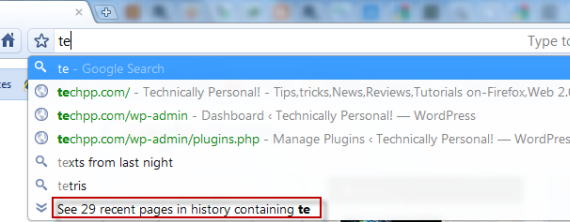
Every time I start up my Chrome browser, I find that all the previous searches I have done are stored, whether from the Google search box or when I’m actually on the Google home page.

Google home page


No, it’s not Google who is storing the info, rather it is your browser.
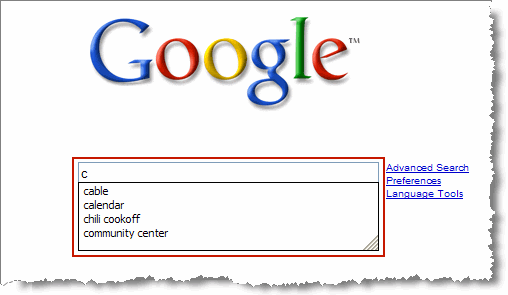
How to Delete your Google Search History?

 Delete your Google Search History

The search box on the Google homepage displays query suggestions both from your own previous searches and other relevant queries. The second set of queries is powered by Google Auto Suggest. However, your previous searches, i.e your search history are stored by your browser, not by Google.
The below instruction is for deleting search history from the Google home page search box. This is if you manually type in Google.com address in your browser to perform the search.

Internet Explorer 8
1. Go to Tools menu
2. Select Internet Options
3. On General tab, click on the “Delete…” button from the Browsing History area.
4. Select the “Form Data” checkbox and click on “Delete” button to clear forms.

Firefox
1. Click the Tools menu.
2. Select Clear Private Data.
3. Select Saved Form and Search History.
4. Click the Clear Private Data Now button.

Google Chrome
1. Click on Tools (spanner icon)
2. Click on Options
3. Select Under the Hood tab.
4. Click on Clear browsing data
5. Select Clear saved form data
6. Click on Clear browsing data.
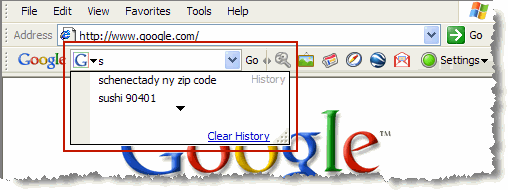
How to Clear your Google Toolbar history?

Clear your Google Toolbar history

To clear your search history in the drop-down search box on the Google Toolbar, follow these steps:

1. Click the arrow on the right-hand side of the Toolbar search box.

2. Click the Clear History link.
Better option is to stop saving search history on Google toolbar. To do this click on Tools icon and deselect “Store search history on my computer” and save it.

 How to Clear your Address bar History?

Clear your Address bar History


The browser’s address bar also acts as a search bar. And if you’ve set your default search engine to be Google, it acts like the Google toolbar also, even though it’s not.

Internet explorer
1. Click on Tools menu.
2. Click on Internet Options
3. Select the General tab
4. Click on the Clear History button
5. Confirm that you want your history deleted.
This will clear all of your history, including the list of places you’ve visited in the History window.

Firefox
1.Click the Tools menu.
2.Select Clear Private Data.
3.Select the ‘Browsing History’ option.
4.Click the Clear Private Data Now button.

Safari
1.Click the History menu.
2.Select Clear History.

Make use of Private Browsing option

Most of the browsers these days provide “private browsing” mode (or Incognito mode). That’s the best thing to opt for all the privacy freaks out here. Makes worrying about histories, caches, and similar all moot. Remember to turn on private browsing whenever you want to explore the net without leaving any sort of trail behind you.


Wednesday, 4 December 2013

HOW SEARCH ENGINES WORK


Today we will show How a search engine works. Here I will not go on detail, But a breif description on this. Hope you Enjoy and learn something.

There are many search engines on the world of Internet. Top on them Is Google.

Search engine:- Google, Bing, Yahoo, AltaVista, Excite and many More.

Later on We will learn How Google works?


HOW SEARCH ENGINES WORK ?


What happens when a searcher[users] enters keywords?

A Search engine does not examine every page on the web. When a user puts in a query on the search box, the engine first builds an index of it

Custom database of all the words on all pages

– Search engine also stores other information.


The search query is everything that the user types to get results which is made up of one or more search terms, plus optional special characters.

FIRSTLY


It examine the Query what the user are for searching, and then expand that query. Means check the words variants[ plural/singular, verbs, Nouns]
  •  Then check the Spelling on the Query.
  •  Check the word order
  •  Checks the search operator [e.g. putting IP: ip address] for searching the Ip of sites.

Next It match the query presents on its database [SERVER]. After then It match the query with all the data that have been Crawled by it.

The Results are sent to the Index Server where it is indexed that which query should be displayed first on the searched results.

This results is made by the rank of the page, which is known as PAGE RANK.
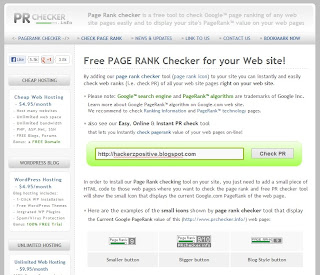
page rank

You can check your page rank of your site from HERE

After all these process finally there required results displayed on your screen.
All thses is done within a seconds only and it gives you the results what you wants.
Hope these help you.
HOW GOOGLE WORKS 

HERE WE WILL KNOW HOW GOOGLE WORKS ?

google
As we all know that GOOGLE is the worlds most popular Search engine on our planet Earth. All Most, all user use www.google.com to search any query or any stuff on the internet.INTRODUCTION

Google began in March 1996 as a research project by Larry Page and Sergey Brin, Ph.D. students at Stanford, California, U.S. 

The term "Google" was originally "Googol", A term meaning the number "1" followed by 100 zeros, created by prominent mathematician Edward kasner.

Google search engine is a web search owned by Goolge Inc. and is the most used search engine on the web.


How it works.?
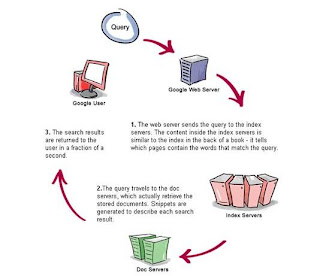
How google works
Firstly when users enter search query on the google search box, and after pressing enter OR clicking on the search option. The query goes to Google Web Server

The web server sends the query to the index servers. The content inside the index servers is similar to the index in the back of a book. It tell which pages contain the words that match any particular query term.

The query travels to the doc servers, which actually retrieve the strored documents. Snippers are generated to describe each search results.

The Search results are returned to the user in a fraction of a second.

Search engines gather the information and the number of web pages from internet with the help of small software known as "Spiders or Google Bot"

Google store the complete content of a web page which is known as Cache, whereas other search engines stores only keywords.


Google allows upto 32 words to enter in the query box.

Hope you Understand How GOOGLE works ?

15-Most Usefull Hacking Tools


Note: This tutorial is only for Educational Purposes, I did not take any responsibility of any misuse, you will be solely responsible for any misuse that you do.

1. NMAP

Nmap (“Network Mapper”) is a free and open source (license) utility for network discovery and security auditing. Nmap uses raw IP packets in novel ways to determine what hosts are available on the network, what services (application name and version) those hosts are offering, what operating systems (and OS versions) they are running, what type of packet filters/firewalls are in use, and dozens of other characteristics.

DOWNLOAD IT FROM HERE      


2. WIRESHARK

Wireshark is a network protocol analyzer. It lets you capture and interactively browse the traffic running on a computer network.

DOWNLOAD IT FROM HERE        


3. METASPLOIT COMMUNITY EDITION

Metasploit Community Edition simplifies network discovery and vulnerability verification for specific exploits, increasing the effectiveness of vulnerability scanners. This helps prioritize remediation and eliminate false positives, providing true security risk intelligence.

DOWNLOAD IT FROM HERE      


4. NIKTO2

Nikto is an Open Source (GPL) web server scanner which performs comprehensive tests against web servers for multiple items, including over 6400 potentially dangerous files/CGIs, checks for outdated versions of over 1200 servers, and version specific problems on over 270 servers. It also checks for server configuration items such as the presence of multiple index files, HTTP server options, and will attempt to identify installed web servers and software.

DOWNLOAD IT FROM HERE                


5. JOHN THE RIPPER

John the Ripper is a fast password cracker, currently available for many flavors of Unix, Windows, DOS, BeOS, and OpenVMS. Its primary purpose is to detect weak Unix passwords. Besides several crypt(3) password hash types most commonly found on various Unix systems, supported out of the box are Windows LM hashes, plus lots of other hashes and ciphers in the community-enhanced version.

DOWNLOAD IT FROM HERE


6. ETTERCAP

Ettercap is a comprehensive suite for man in the middle attacks. It features sniffing of live connections, content filtering on the fly and many other interesting tricks. It supports active and passive dissection of many protocols and includes many features for network and host analysis.

DOWNLOAD IT FROM HERE


7. NEXPOSE COMMUNITY EDITION

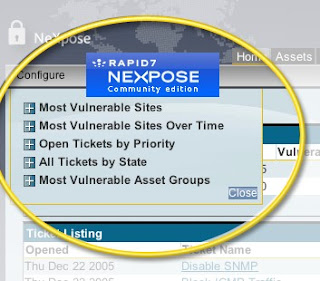
The Nexpose Community Edition is a free, single-user vulnerability management solution. Nexpose Community Edition is powered by the same scan engine as Nexpose Enterprise and offers many of the same features.

DOWNLOAD IT FROM HERE


8. NCAT

Ncat is a feature-packed networking utility which reads and writes data across networks from the command line. Ncat was written for the Nmap Project as a much-improved reimplementation of the venerable Netcat. It uses both TCP and UDP for communication and is designed to be a reliable back-end tool to instantly provide network connectivity to other applications and users. Ncat will not only work with IPv4 and IPv6 but provides the user with a virtually limitless number of potential uses.

DOWNLOAD IT FROM HERE


9. KISMET

Kismet is an 802.11 layer2 wireless network detector, sniffer, and intrusion detection system. Kismet will work with any wireless card which supports raw monitoring (rfmon) mode, and (with appropriate hardware) can sniff 802.11b, 802.11a, 802.11g, and 802.11n traffic. Kismet also supports plugins which allow sniffing other media such as DECT.

DOWNLOAD IT FROM HERE


10. W3AF    

w3af is a Web Application Attack and Audit Framework. The project’s goal is to create a framework to find and exploit web application vulnerabilities that is easy to use and extend.

DOWNLOAD IT FROM HERE


11. HPING

hping is a command-line oriented TCP/IP packet assembler/analyzer. The interface is inspired to the ping(8) unix command, but hping isn’t only able to send ICMP echo requests. It supports TCP, UDP, ICMP and RAW-IP protocols, has a traceroute mode, the ability to send files between a covered channel, and many other features.

DOWNLOAD IT FROM HERE


12. BURPSUITE            

Burp Suite is an integrated platform for performing security testing of web applications. Its various tools work seamlessly together to support the entire testing process, from initial mapping and analysis of an application’s attack surface, through to finding and exploiting security vulnerabilities.

DOWNLOAD IT FROM HERE


13. THC-HYDRA      

A very fast network logon cracker which support many different services.

DOWNLOAD IT FROM HERE


14. SQLMAP      

sqlmap is an open source penetration testing tool that automates the process of detecting and exploiting SQL injection flaws and taking over of database servers. It comes with a powerful detection engine, many niche features for the ultimate penetration tester and a broad range of switches lasting from database fingerprinting, over data fetching from the database, to accessing the underlying file system and executing commands on the operating system via out-of-band connections.

DOWNLOAD IT FROM HERE


15. WEBSCARAB

WebScarab has a large amount of functionality, and as such can be quite intimidating to the new user. But, for the simplest case, intercepting and modifying requests and responses between a browser and HTTP/S server, there is not a lot that needs to be learned.

DOWNLOAD IT FROM HERE

Finding Serial/Crack Key Of Any Software Using Simple Google Trick

Most of you download and use pirated software from torrents or any such other sites, but sometime it gets very difficult to find serial key of those softwares. I will make it easy for you by showing you simple yet very intersting google trick which will allow you to find serial key of any software very easily.

How To Find Serial Key Of Any Software ?

The key 94FBR is a part of  Office 2000 Pro CD activation key that is widely distributed as it bypasses the activation requirements of Office 2000 Pro. By searching for 94fbr and the product name, you are guarantee that the pages that are returned are pages dealing specifically with the product you're wanting a serial for. Follow simple steps given below to learn this trick

    1. Go to Google
    2. Then type  Software Name 94FBR
  • Replace Software Name with the name of software whose serial key you want to find
  • Eg: To find serial key of Nero i will type Nero 94fbr
    3. Now press Enter and you will find serial key of software you are looking for as shown below.

Top 10 Google tricks

Below is a list of our top ten Google tricks many people who use Google don't know about.
Definitions
Pull up the definition of the word by typing define followed by the word you want the definition for. For example, typing: define bravura would display the definition of that word.
Local search
Visit Google Local enter the area you want to search and the keyword of the place you want to find. For example, typing: restaurant at the above link would display local restaurants.
Phone number lookup
Enter a full phone number with area code to display the name and address associated with that phone number.
Find weather and movies
Type "weather" or "movies" followed by a zip code or city and state to display current weather conditions or movie theaters in your area. For example, typing weather 84101 gives you the current weather conditions for Salt Lake City, UT and the next four days. Typing movies 84101 would give you a link for show times for movies in that area.
Track airline flight and packages
Enter the airline and flight number to display the status of an airline flight and it's arrival time. For example, type: delta 123 to display this flight information if available.
Google can also give a direct link to package tracking information if you enter a UPS, FedEx or USPS tracking number.
Translate
Translate text, a full web page, or search by using the Google Language Tools.
Pages linked to you
See what other web pages are linking to your website or blog by typing link: followed by your URL. For example, typing link:http://www.google.com displays all pages linking to Computer Hope.
Find PDF results only
Add fileType: to your search to display results that only match a certain file type. For example, if you wanted to display PDF results only type: "dell xps" fileType:pdf -- this is a great way to find online manuals.
Calculator
Use the Google Search engine as a calculator by typing a math problem in the search. For example, typing:100 + 200 would display results as 300.
Stocks
Quickly get to a stock quote price, chart, and related links by typing the stock symbol in Google. For example, typing: msft will display the stock information for Microsoft.
EnjoY>>(-__-)