Pages

Showing posts with label Information. Show all posts

Thursday, 7 June 2018

See who is online on facebook in offline mode


There is a simple trick by which you can know who is online on facebook when you are in offline mode.Just follow below steps.


1). Log in to your facebook account.

2). Turn off chat in your account.


3) Go to this application page and install it.


4) After install this application you able to show, who is online on facebook while you are offline on facebook account.


Now if you want to chat someone you can send him/her messages knowing that he/she  is online.

Chat in MS-DOS using IP address

It is easy and simple trick. using batch programming.


You can try this in your school or college systems(it should be networked systems).

Step 1: 
Get  the ip address of your friend's system.
if you are using college or school system,then ip address will be in particular range.

Step 2:
copy the following Batch code in notepad:

@echo off
:A
Cls
echo TypeIPAddress
set /p n=IPAddress:
set /p m=Message:
net send %n% %m%
Pause
Goto A

Save the file with .bat extension(For Eg: message.bat)

Step 3:
Open command prompt and navigate to that batch file location.
open the file in notepad.

If you don't know how to move to that path,simply drog and drop in cmd.Then hit enter.

Step 4:
Now it will ask you for the IPAddress.
Enter the IP address which you want to send message.
Hit enter
Now it will ask you for the message.
Enter and hit enter

Note:
The user with whom you connecting system's cmd should be opened in order to receive.

Saturday, 2 June 2018

How to Clear Google Search History and Safeguard Your Privacy

“Google Privacy” – that sounds like an oxymoron, isn’t it? Whenever I think about it, I get scared to no end. My primary (and secondary and tertiary) search engine is Google, I use Google mail, my primary IM is Google Talk, I use Google apps for work, Google docs has kicked out MS Office on my PC, Google Chrome is my default browser and worst of all, my DNS provide is Google again. Add Google Reader, maps, News, Picasa and Youtube to the list, hardly 10% of my online life is sans Google.
Clear Google Search History


Does Google store every search I do?
Every time I start up my Chrome browser, I find that all the previous searches I have done are stored, whether from the Google search box or when I’m actually on the Google home page.


Google home page


No, it’s not Google who is storing the info, rather it is your browser.

How to Delete your Google Search History?
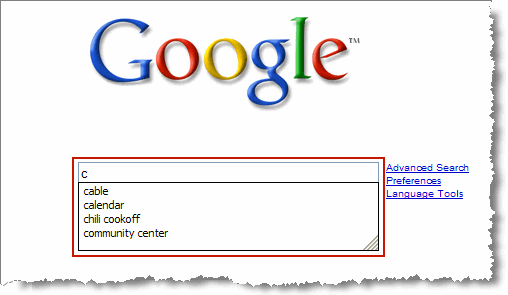
 Delete your Google Search History

The search box on the Google homepage displays query suggestions both from your own previous searches and other relevant queries. The second set of queries is powered by Google Auto Suggest. However, your previous searches, i.e your search history are stored by your browser, not by Google.
The below instruction is for deleting search history from the Google home page search box. This is if you manually type in Google.com address in your browser to perform the search.

Internet Explorer 8
1. Go to Tools menu
2. Select Internet Options
3. On General tab, click on the “Delete…” button from the Browsing History area.
4. Select the “Form Data” checkbox and click on “Delete” button to clear forms.

Firefox
1. Click the Tools menu.
2. Select Clear Private Data.
3. Select Saved Form and Search History.
4. Click the Clear Private Data Now button.

Google Chrome
1. Click on Tools (spanner icon)
2. Click on Options
3. Select Under the Hood tab.
4. Click on Clear browsing data
5. Select Clear saved form data
6. Click on Clear browsing data.

How to Clear your Google Toolbar history?
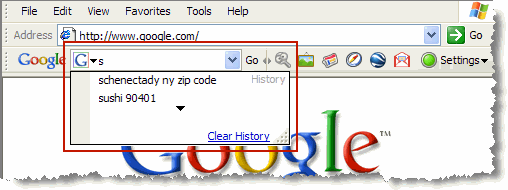
Clear your Google Toolbar history

To clear your search history in the drop-down search box on the Google Toolbar, follow these steps:

1. Click the arrow on the right-hand side of the Toolbar search box.

2. Click the Clear History link.
Better option is to stop saving search history on Google toolbar. To do this click on Tools icon and deselect “Store search history on my computer” and save it.

 How to Clear your Address bar History?

Clear your Address bar History


The browser’s address bar also acts as a search bar. And if you’ve set your default search engine to be Google, it acts like the Google toolbar also, even though it’s not.

Internet explorer
1. Click on Tools menu.
2. Click on Internet Options
3. Select the General tab
4. Click on the Clear History button
5. Confirm that you want your history deleted.
This will clear all of your history, including the list of places you’ve visited in the History window.

Firefox
1.Click the Tools menu.
2.Select Clear Private Data.
3.Select the ‘Browsing History’ option.
4.Click the Clear Private Data Now button.

Safari
1.Click the History menu.
2.Select Clear History.

Make use of Private Browsing option

Most of the browsers these days provide “private browsing” mode (or Incognito mode). That’s the best thing to opt for all the privacy freaks out here. Makes worrying about histories, caches, and similar all moot. Remember to turn on private browsing whenever you want to explore the net without leaving any sort of trail behind you.


Saturday, 5 March 2016

Simple Trick To Use Web Browsers As Text Editor

 Web Browsers As Text Editor
In this tutorial i will show you a simple and interesting trick to use your web browser such as Google Chrome or Mozilla Firefox as a simple text editor like Notepad. This trick works on all web browsers. So lets get started.

How To Do ?

   1 Copy below code in browser Url Section

 data:text/html, <html contenteditable>

   2. Now Press Enter.
   3. Now you can type anything as would do on any other text editor like Notepad.
   4. To save your text file Press Ctrl + S and save it as anything.txt (.txt Is Must)

Computer/Browser Cookies and Uses of Cookies


What is Cookies?

 HTTP cookie or Browser Cookie are used to store the information about the visitors. Also cookies used to store the Login informations(username ,passwords). It will be useful to track visitors wish so that display the related info or ads.

SQL Injection Tutorial: All common SQL injection problems and Solutions [FULL]

     SQL injection and solutions to them. Probably every person who has looked at tutorials to hack a website have noticed that there are too much SQL tutorials. Almost every forum has 10 tutorials and blogs 5 tutorials about SQL injection, but actually those tutorials are stolen from somewhere else and the author doesn't probably even know why does SQL injection work. All of those tutorials are like textbooks with their ABC's and the result is just a mess. Everyone are writing tutorials about SQL, but nobody covers the problems what will come with that attack.

Set Password to Microsoft Office 2007 files ?


Keep your  Microsoft files safe and secure. Set password to Microsoft Office files (.doc ,.ppt, etc) to make  safe and secure.

-First open  any Microsoft office's component such as Word, Powerpoint, Excel etc.   
-Click on Office button  

What are Captchas?

"Because we care, we're security aware"

Whenever we create an account on any website or comment on any blog we see scrambled words
which we have to type and continue these are CAPTCHAs . 

How the Password should be for not to get Hack?


See Who Is Online On Facebook In Offline Mode From Mobile Without Online App

Here is the best trick for mobile to be in Offline mode and See which Friends are online form 'Mobile Phone' without any online thirdparty online App for u all fanz discovered by US.


Access Gmail offline!!!


GMail introduced a new feature recently, that is browsing mails offline. Here for u fanz.


Steps:~

Today we are going to see how to do that.

First you need to install Google Gears, you can download the online installer from here
http://gears.google.com/

Run the online installer and it will install Google Gears on your system.

Now open your GMail and navigate to the settings and then to the Labs tab, there you will find a feature called offline, Enable that.

Thats it you are almost done, just a few clicks away. It will ask your permission to install offline access for GMail, click next.Then you get a Google Gears security warning, allow it.Click ok in the next window and you are done.It will download all your mails to your hard drive for offline browsing. You can see the status in the status window.

Have fun browsing gamil offline.


How Hackers Send Virus,RAT,.EXE Files to Victim on Facebook,Gmail,Yahoo etc.

FIRSTLY I WILL TELL YOU WHAT IS A COMPUTER VIRUS


WHAT IS A COMPUTER VIRUS ?

A potentially damaging computer program’s, capable of reproducing itself causing great harm to files or other programs without permission or knowledge of the user.

Protect yourself from Keyloggers Using Keyscrambler

What is Keylogger?

Read it at => Keyloggers Complete Guide

What is Keyscrambler?


  1. KeyScrambler encrypts your keystrokes in the kernel and decrypts it at the destination application, leaving Keyloggers with indecipherable keys to record. For your personal office, family, and business, KeyScrambler adds a reliable layer of defense.

Linux Password working | etc/Passwd File Format

Hey Friends Here is your Query Solved! Today we will learn How Linux Password works and will understand etc/Passwd file format in detail.. So let me explain first what is etc/Passwd is? Where it is used?

Top 7 Android Security/Antiviurs Apps | One Must Have Any One


If you are a active internet/web user, you must be knowing the potential dangers that lurk online which includes harmful malwares, viruses, Trojans and spyware bots etc. These threats exposes your private/personal data to hackers (unwanted users) and put your privacy at risk. So to avoid any such risks its necessary to use good security apps that can protect yourself from all the above mentioned threats and potential dangers.
These security apps allow users to protect themselves from not only online harmful threats (malware, spyware, etc) but also from physical ones such as in the case of the phone being misplaced or stolen. So We brings top Android security apps list for android phones. One Must Have It.

How do you protect your computer from viruses


" How to stop virus or Trojan attacks" from infecting your system. After previous three hacking classes about "Introduction to virus, Trojan, backdoor" and "Different types of Viruses" most of the users asked How to prevent our systems from infecting from viruses. There are several ways to protect your system from being infected. I will try to share almost all tricks. And the most important thing is that after reading this article your system will be 100% secured from all types of Virus attacks but Trojan attacks can happen because of your negligence but i will try to tell all things so that this can also  does not happen. So Guys read on and stop wasting time in removing viruses or Trojans from your computer because from now a single virus cannot enter into your system Its my Guarantee and challenge to all hackers.

Protect Your Facebook Account From Hackers

Protect your Facebook Account? Are you worried? So Do not Worry fanz here is the tutorial  for you all how to Protect your Facebook Account. Please read and understand all topics properly.

Complete Hackers Guide


Q: What is hacking?

A: The terms "hack" are also used to refer to a modification of a program or device to give the user access to features that were otherwise unavailable, such as DIY circuit bending. It is from this usage that the term "hacking" is often incorrectly used to refer to more nefarious criminal uses such as identity theft, credit card fraud or other actions categorized as computer crime.

Difference Between Virus Worms Trojan and Spyware


We all have heard the terms Virus,Worms,trojans and spyware but only a few of us know the difference between them.We genreally consider everything that is detected by an antivirus as virus but this is not the case.The antivirus not only provides protection against viruses but it also protects us from trojans,worms and spywares.All these can be harmful to your computer hardware and software.Today I will differentiate all these terms from each other .Ok lets start from the introduction of viruses

How to secure your smartphone from hackers

How to secure your smartphone from hackers


Now a days, We are using smartphone for our daily life such E-mail, facebook, twitter, paypal, banking etc..its all the our personal working. So their is more important to protect our smartphone from being hacked.
Using some security improvement helps you to protect your phone. Actually the method which you adopt  to protect your computer can be used to protect your smartphone too. Use following given below tips to secure your smart phone.